This one little bookmarklet gets used every day in my world
Ever wished you could quickly search within a specific website without navigating to their search function? Or maybe you want to see what pages from your own site are indexed in Google? We’ve got the perfect solution for you.
What This Bookmarklet Does
Our Site Search bookmarklet is a simple one-click tool that:
- Performs instant site-specific searches on any website you’re currently browsing
- Shows you indexed pages from Google for any domain
- Finds specific content within any site using Google’s powerful search capabilities
- Saves time by eliminating the need to manually type “site:” searches
Perfect for SEO professionals, content creators, researchers, and anyone who frequently searches within specific websites.
How It Works
When you click the bookmarklet while on any website, it:
- Automatically detects the current domain you’re browsing
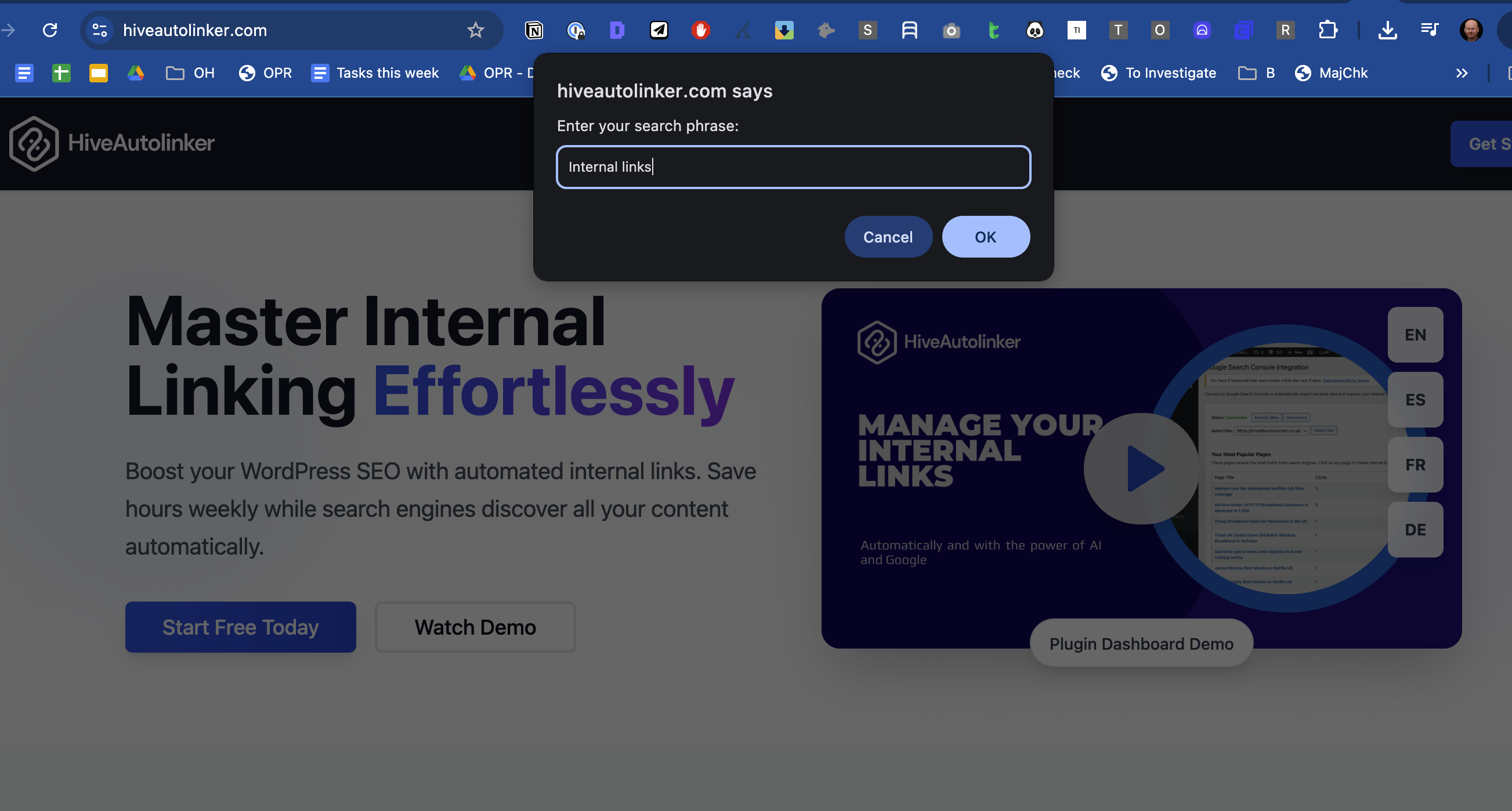
- Prompts you to enter your search terms
- Opens a new tab with a Google search using the format:
site:domain.com your search terms
Installation Instructions
Method 1: Drag and Drop (Easiest)
- Show your bookmarks bar if it’s not visible:
- Chrome/Edge: Press
Ctrl+Shift+B(Windows) orCmd+Shift+B(Mac) - Firefox: Press
Ctrl+Shift+B(Windows) orCmd+Shift+B(Mac) - Safari: Go to View > Show Favorites Bar
- Chrome/Edge: Press
- Drag this link to your bookmarks bar: [Site Search](javascript:(function(){var domain=window.location.hostname;var query=prompt(“Enter your search phrase:”);if(query!==null){window.open(‘https://www.google.com/search?q=site:’+encodeURIComponent(domain)+’ ‘+encodeURIComponent(query));}})();)
Method 2: Manual Creation
If the drag-and-drop method doesn’t work, follow these steps:
- Right-click your bookmarks bar and select “Add page” or “New bookmark”
- Fill in the bookmark details:
- Name:
Site Search(or whatever you prefer) - URL: Copy and paste this entire code:
javascript:(function(){var domain=window.location.hostname;var query=prompt("Enter your search phrase:");if(query!==null){window.open('https://www.google.com/search?q=site:'+encodeURIComponent(domain)+' '+encodeURIComponent(query));}})(); - Name:
- Save the bookmark
Method 3: Import via Bookmark Manager
- Open your browser’s bookmark manager:
- Chrome: Menu > Bookmarks > Bookmark manager
- Firefox: Menu > Library > Bookmarks > Manage bookmarks
- Safari: Bookmarks > Edit Bookmarks
- Create a new bookmark with the details from Method 2
How to Use the Bookmarklet
- Navigate to any website you want to search
- Click the “Site Search” bookmark in your bookmarks bar
- Enter your search terms in the popup dialog
- Hit OK and watch as a new tab opens with your site-specific Google search results
Practical Use Cases
For Website Owners & SEO Professionals
- Check indexation: See which of your pages Google has indexed
- Monitor keyword presence: Find pages that mention specific keywords
- Competitive analysis: Quickly search competitor sites for specific topics
- Content audits: Locate pages with outdated information or specific terms
For Researchers & Content Creators
- Deep dive research: Find specific information within authoritative sites
- Fact checking: Quickly search news sites or official sources
- Content inspiration: See how other sites cover similar topics
For General Users
- Shopping: Find specific products on e-commerce sites
- Troubleshooting: Search support sites for specific error messages
- Academic research: Search specific educational institutions or journals
Why This Beats Regular Site Search
Many websites have poor internal search functions, but Google has likely indexed their content comprehensively. This bookmarklet leverages Google’s superior search capabilities while limiting results to your target site.
Benefits over built-in site search:
- More comprehensive results
- Better search algorithm
- Finds content even if the site’s search is broken
- Works on every website, even those without search functions
Pro Tips
- Leave the search blank and just hit OK to see all indexed pages from the current domain
- Use specific keywords to find exactly what you’re looking for
- Combine with Google search operators like quotes for exact phrases
- Works great for finding contact pages: Search for “contact” or “about”
Troubleshooting
Bookmarklet not working?
- Make sure you copied the entire JavaScript code
- Try creating the bookmark manually instead of dragging
- Check that JavaScript is enabled in your browser
No search dialog appearing?
- Your browser might be blocking popups – check your popup settings
- Try clicking the bookmarklet again
Technical Details
This bookmarklet uses vanilla JavaScript and:
- Automatically detects the current domain using
window.location.hostname - Properly encodes search terms to handle special characters
- Opens results in a new tab so you don’t lose your place
The code is lightweight, secure, and works across all modern browsers.
Ready to supercharge your site searches? Install the bookmarklet now and experience the power of instant, Google-powered site search on any website you visit!
Found this useful? Share it with your fellow researchers, SEO professionals, and productivity enthusiasts!
Leave a Reply